
The Best Bouncing Ball Simulators in 2026 (Tested & Compared)
A fair, in-depth comparison of the best ball simulation software for creators in 2026, features, music sync, export quality, learning curve, price model, and who each tool is really for.
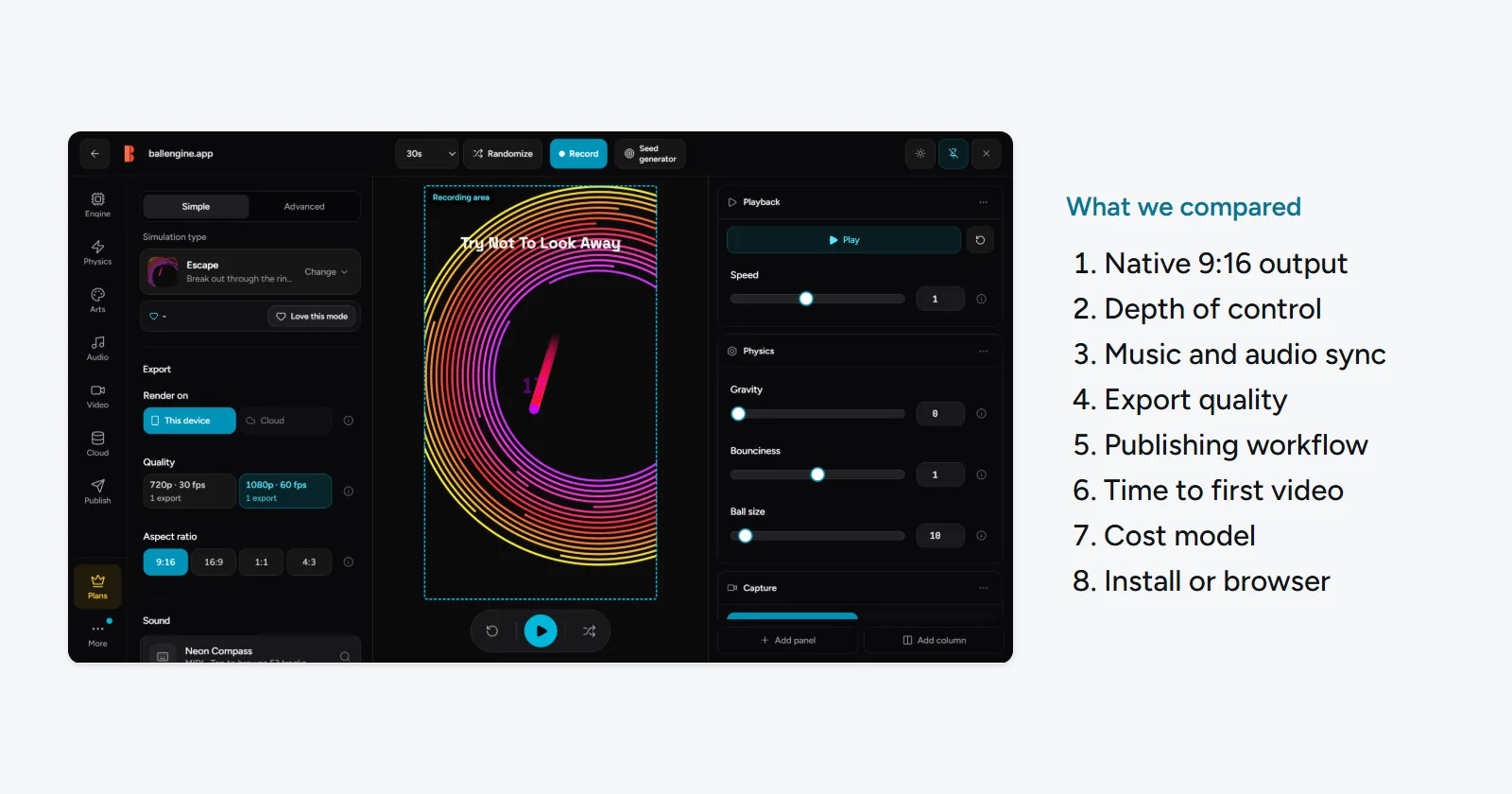
The Best Bouncing Ball Simulators and Physics Simulation Software for Creators in 2026
Bouncing-ball physics videos are one of the most reliable formats in short-form content. A single ball ricocheting inside a shrinking circle, a swarm of marbles racing down a track, or a note-perfect melody played by colliding balls can hold attention in a way that few other faceless formats can. But the phrase "ball simulator" covers a huge range of tools, from throwaway browser toys to industrial 3D suites, and picking the wrong one can mean hours wasted on software that was never built for what you actually want to make.
This roundup compares the realistic options for creators in 2026, from purpose-built studios like BallEngine to general-purpose powerhouses like Blender, free browser sandboxes, mobile apps, and code-first physics engines. The goal is not to crown one tool for everyone. It is to help you match a tool to your goal, your skill level, and your publishing workflow, so you spend your time creating instead of fighting your software. Every tool here is genuinely the right answer for somebody; the trick is knowing whether that somebody is you.
Key takeaways
- For creators who want music-synced physics videos and one-click publishing, BallEngine is the most complete purpose-built option, mainly because bounces can play the actual notes of a song.
- Free browser ball sandboxes are great for a quick play but fall short on depth, export quality, and audio sync.
- Blender is the most powerful and is free, but it is a 3D desktop suite with a steep learning curve, not a fast path to a vertical clip.
- Code-first engines (matter.js and friends) and game engines (Unity, Godot) offer unlimited flexibility but require programming and have no built-in publishing.
- Mobile "satisfying ball" apps are convenient but tend to be shallow, watermarked, and ad-heavy.
- Choose by outcome: a faceless short-form channel, a one-off hobby render, a photoreal 3D shot, or a custom coded interactive each point to a different winner.
How we picked: what actually matters in a ball simulator
"Best" only means something once you know what you are optimizing for. A tool that is perfect for a developer prototyping a game is a poor fit for someone who wants to post a satisfying vertical clip every day. We evaluated each tool against the criteria that decide whether you will actually finish and publish videos, not just whether the physics look nice in a preview window. A simulator can have flawless collision math and still be the wrong choice if it takes you an hour to get a clean vertical clip out of it.
- Purpose fit for short-form video. Does it output 9:16 vertical natively, or are you cropping and reframing after the fact?
- Depth of control. How many parameters can you actually tune (gravity, restitution, spawn rules, collisions), and how far can you push a scene before you hit a wall?
- Audio and music sync. Can the simulation drive sound, or better, can the physics play a real song? This is the single biggest differentiator for viral bounce content.
- Export quality. Resolution, frame rate, and whether the render is clean and watermark-free.
- Publishing workflow. Once the clip is done, how much friction is there between "render complete" and "posted to TikTok"?
- Learning curve and time to first video. How long from opening the tool to having something worth posting?
- Cost model. Free, freemium, one-time, or subscription, and what you actually get at each tier.
- Platform and install. Browser-based and zero-install, or a heavy desktop download with hardware requirements?
The most underrated criterion is the gap between "render finished" and "posted." Many tools stop at the export button. For a creator posting daily, built-in publishing and scheduling can save more time than any physics feature.
One more thing worth naming up front: consistency beats perfection for short-form. The tool that lets you ship three solid clips a week will almost always outperform the tool that produces one flawless render a month. As you read the sections below, weigh each option not just on its ceiling but on how sustainably you could actually use it week after week.
The comparison at a glance
Here is how the main contenders stack up across the criteria that matter most for creators. Read the per-tool sections below for the nuance behind each cell, because a short "weak" or "strong" always hides trade-offs.
| Tool | Best for | Music sync | Export quality | Publishing | Learning curve | Price model |
|---|---|---|---|---|---|---|
| BallEngine | Faceless short-form creators | Yes, bounces play a song | Up to 4K/60fps 9:16 | Built-in to 8 platforms + Autopilot | Low | Free + Creator/Pro |
| Free browser sandboxes | Quick casual play | Rarely / none | Screen-capture only, low | None | Very low | Free |
| Blender | 3D pros and photoreal renders | Manual, advanced only | Very high, any format | None | High | Free |
| Code engines (matter.js) | Developers and tinkerers | DIY in code | DIY in code | None | High (coding) | Free / open source |
| Mobile ball apps | On-the-go casual clips | Limited | Often watermarked | Sometimes native share | Very low | Free + ads / IAP |
| Game engines (Unity/Godot) | Game devs, interactive builds | DIY in code | Very high | None | High | Free / paid tiers |
BallEngine: the music-sync specialist for creators
BallEngine is a browser-based, zero-install physics studio built specifically for short-form vertical video. That focus is the whole point. Where most tools treat social publishing as an afterthought, BallEngine is designed end to end around the workflow of a faceless creator: open a mode, tune the simulation, record a 9:16 clip, and publish it, all in one place with no editing skills required.
Its core differentiator is music sync. In Rhythmic Mode, the ball's bounces play the actual notes of a song. You can import a MIDI file, pick a musical scale, and the collisions land on the melody, so the physics and the audio are one thing rather than a track laid on top in an editor. There is a built-in Audio Studio and spatial audio, which is why so much of the platform's output has that "the ball is playing the song" quality that performs well on TikTok and Shorts. If you want a step-by-step, we wrote a full guide on how to make a bouncing ball synced to music.
Underneath the simple interface sits real depth: more than 1,000 editable physics parameters and dozens of modes, including Rhythmic, Spawner, Escape, Ghost Escape, Breaker, Drawer, Trail, Spiral, Plinko, Marble Run, and Merge 2048. You can start with a preset and post in minutes, or go deep and tune gravity, restitution, spawn logic, and collisions until a scene behaves exactly how you imagined. Exports run up to 4K/60fps in native 9:16, and the built-in publishing pushes to TikTok, YouTube, Instagram, Facebook, Threads, Pinterest, X, and Snapchat, with a recurring "Autopilot" for hands-off scheduling.
Best for
Faceless and short-form creators who want music-synced physics videos and want to publish them without touching a separate editor or scheduler. It is also a strong fit for anyone building a physics-simulation YouTube channel or a daily TikTok posting habit. If your ambition is a repeatable content engine rather than a single showpiece render, this is the profile it was designed around.
Picture a creator who wants to post a satisfying clip every day but has no video-editing background and no desire to learn one. They pick a song, import the MIDI, choose a mode, let the physics play the melody, hit export, and schedule the post, all before their coffee is done. That loop, repeated daily, is the exact scenario BallEngine is built to make frictionless, and it is where a purpose-built tool pulls decisively ahead of general-purpose software.
- Music sync where bounces play a real song (MIDI import, musical scales, Audio Studio, spatial audio).
- Zero install, runs in the browser on modest hardware.
- More than 1,000 editable parameters and dozens of modes, so depth is there when you want it.
- Native 9:16 export up to 4K/60fps, no external editor needed.
- Built-in publishing to eight platforms plus recurring Autopilot scheduling.
- Free to start, with a low time-to-first-video and no editing skills required.
- Presets get you posting fast, while deep parameters mean you rarely outgrow it.
- Focused on 2D-style physics-video content, not a general-purpose 3D or game-dev tool.
- Deepest features (higher-resolution export, a bigger monthly export allowance, advanced options) sit behind Creator, Pro, Elite and Agency tiers; publishing is a separate automation plan.
- If your goal is photoreal 3D cinematics rather than short-form clips, a dedicated 3D suite will go further.
- The sheer number of parameters can feel like a lot at first, though presets soften that.
The thing no free sandbox or general 3D suite matches out of the box: the ball doesn't just bounce, it plays the song.
Free browser ball sandboxes
Sites like BallSimulator.com and the many similar free browser ball-physics toys are the fastest way to watch a ball bounce. You open a tab, drag a slider or two, and you are playing. For a casual doodle, a quick physics demo, or explaining a concept to someone, they are genuinely useful and cost nothing. There is a real charm to that immediacy, and for a lot of people it is exactly enough.
The trade-off is depth and output. These sandboxes typically expose a handful of settings rather than deep parameter control, rarely offer real audio sync, and have no true export pipeline, so getting a clean vertical clip usually means screen-recording, which caps quality and often leaves you cropping afterward. There is no built-in publishing. They are a toy and a demo, not a production tool, and that is fine as long as you are not trying to run a channel on one.
Best for
Quick casual play, learning what a parameter does, or a throwaway experiment. If you are weighing options, our ball simulator alternatives page walks through where each type fits.
A good example: you have seen the format on your feed and you want to know whether tweaking gravity is actually fun before you commit to anything. Five minutes in a free sandbox answers that. What it will not do is get you to a watermark-free, music-synced, 4K vertical clip that is ready to schedule, so treat it as a taster, not a kitchen.
- Instant, no sign-up, no install.
- Free.
- Low friction for a quick experiment or demo.
- A genuinely good way to learn what each physics setting does before investing in a fuller tool.
- Shallow control compared to a dedicated studio.
- Little or no music sync.
- No proper export; screen-capture caps quality and aspect ratio.
- No built-in publishing or scheduling.
- Output rarely feels distinct, since everyone is working from the same limited presets.
Blender (rigid-body and physics simulation)
Blender is a free, open-source 3D suite that can do genuinely stunning physics. Its rigid-body and soft-body systems, combined with a full 3D renderer, can produce photoreal bouncing-ball scenes with real materials, lighting, and depth that no lightweight tool can touch. It is one of the most capable creative applications available, and it costs nothing. In the right hands it is a ceiling almost nothing else reaches.
The catch is that Blender is a professional 3D application, not a short-form-video appliance. It is a desktop install with real hardware demands, the learning curve is steep, and getting a clean vertical clip means learning simulation setup, camera work, rendering, and export. There is no built-in social publishing and nothing purpose-built for the daily-clip workflow. The power is real, but so is the time investment, and for a creator that time is the actual cost.
Best for
3D artists and anyone chasing photoreal or cinematic renders who is willing to invest in the learning curve, and who values maximum control over speed to publish.
Consider someone who already knows their way around 3D software and wants one hero render with realistic glass, soft shadows, and a slow cinematic camera move. Blender is the obvious pick, and the result can be spectacular. But if that same person then wants to turn it into a daily posting habit, they will feel the friction quickly, because each polished clip is a project, and the publishing still has to happen somewhere else.
- Extremely powerful, true 3D physics and rendering.
- Free and open source.
- Full control over materials, lighting, camera, and output format.
- Huge community and learning resources.
- No practical ceiling on visual quality if you invest the time.
- Steep learning curve; not a fast path to a first clip.
- Desktop install with real hardware requirements.
- Not purpose-built for vertical short-form; you set up 9:16 yourself.
- No native music-sync-to-physics; audio is a manual, advanced task.
- No built-in publishing or scheduling.
- High-resolution renders can be slow, which works against a fast posting cadence.
Code-first physics engines (matter.js and similar)
Open-source physics engines like matter.js, and the many browser toys built on them, are the tinkerer's choice. If you can write JavaScript, you can build almost anything: custom collision rules, bespoke spawn behavior, interactive experiences, or a one-off simulation tuned exactly to your idea. The flexibility is effectively unlimited because you are programming the physics directly, and for the right person that is deeply satisfying.
That flexibility is also the cost. You need to code, there is no timeline or export UI out of the box, and turning a running simulation into a clean, published vertical video is entirely on you to build. Music sync, high-quality recording, and publishing are all DIY. For a developer this is a feature; for a creator who just wants to post, it is a project in itself, and often a bigger one than it first appears.
Best for
Developers and technical tinkerers building custom simulations or interactive web experiences, where the code is the point. If you want the outcome without the code, a physics video generator that handles rendering and export saves the build.
A fitting scenario: a front-end developer wants a one-of-a-kind interactive on their site, or a very specific rule set no off-the-shelf tool exposes. Writing it against matter.js is the right call, and they will end up with exactly what they imagined. The moment the goal shifts to "and now post a clip of it every day," though, they are effectively building a mini video pipeline from scratch, which is rarely worth it for content alone.
- Unlimited flexibility if you can code.
- Free and open source.
- Great for custom or interactive builds.
- Full control over behavior at the source level.
- No feature gates; if you can imagine it, you can implement it.
- Requires programming knowledge.
- No built-in export, publishing, or scheduling.
- Music sync and recording must be built yourself.
- High time investment before a first finished video.
- You own all the maintenance; nothing is handled for you.
Mobile "satisfying ball" apps
There is a large category of phone apps promising instant satisfying-ball videos. Their appeal is obvious: they live on the device where you also record and post, and you can make something during a spare five minutes. For casual, on-the-go creation, that convenience is real, and for a lot of casual posters it is the entire selling point.
The common downsides are just as real. Many are shallow on control, apply a watermark to free exports, lean heavily on ads or in-app purchases, and cap resolution or customization. Music sync, when present, tends to be limited. They are fine for a quick post, but they rarely support the depth or clean, unbranded output a serious channel needs, and the watermark alone can undercut how professional your clips look.
Best for
Casual creators who want to make something quickly on their phone and are not fussed about deep control or pristine, watermark-free output.
Think of someone waiting for a bus who wants to make one fun clip and share it to their story right now. A mobile app is perfect for that impulse. But someone trying to build a recognizable channel will keep bumping into the same walls: another app's watermark on their content, an ad between every action, and a paywall in front of the settings that would actually make their videos stand out.
- Convenient; create and post from one device.
- Very low learning curve.
- Often free to try.
- Good for spontaneous, one-off clips.
- Usually shallow on parameters and modes.
- Frequent watermarks on free exports.
- Ad-heavy or gated behind in-app purchases.
- Limited music sync and resolution control.
- Hard to develop a distinctive look when everyone uses the same few templates.
Game engines (Unity and Godot)
Unity and Godot are full game engines with excellent, mature physics. In principle you can build any bouncing-ball scene you can imagine, with complete control and high-quality rendering. For someone who already works in these tools, the physics are more than good enough, and the visual output can be excellent.
But for making short-form physics clips, a game engine is overkill. It is a general-purpose development environment: you set up a project, script behavior, and build your own recording and export path, none of which is aimed at quickly producing a vertical video. There is no built-in social publishing. Unless you are already a game developer, the setup cost dwarfs the payoff for this specific use case, and even for developers it is a lot of machinery for a 15-second clip.
Best for
Game developers and technical creators building interactive projects, who happen to also want physics visuals and are comfortable in a full engine.
The natural fit here is a developer who is already inside Unity or Godot for a game and wants a physics moment to double as promotional content. Reusing the engine they know makes sense. Coming to one of these cold, purely to make bounce videos, means learning an entire development environment to solve a problem that lighter tools solve in minutes.
- Powerful, mature physics and rendering.
- Total control over behavior and visuals.
- Free or low-cost entry tiers.
- Strong ecosystems and documentation.
- Ideal if you are already building a game in the same engine.
- Overkill for short-form clips; heavy setup.
- Requires programming and engine knowledge.
- No purpose-built vertical export or publishing.
- Slow time-to-first-video for this use case.
- You build the recording and music-sync pipeline yourself.
What actually makes a physics video perform
Choosing a tool is really choosing which levers you get to pull, and only a few levers move the needle on how a bounce video actually performs. Understanding them tells you which features to care about and which are nice-to-haves. The tool matters because it either gives you these levers cheaply or makes you fight for them.
Music sync is the biggest single differentiator
The clips that travel are almost always the ones where the audio and the motion feel like the same event. When a ball's bounce lands exactly on a note, the viewer's brain registers cause and effect, and that satisfying lock-in is what keeps them watching and rewatching. Faking this in an editor by lining a track up against footage is painstaking and rarely tight. A tool where the physics generate the notes, as in Rhythmic Mode, gets the sync for free because there is nothing to line up; the collision is the note. This is the clearest reason music-sync capability outweighs almost every other feature for this format.
Export quality and aspect ratio decide how it reads on the feed
Short-form platforms are vertical, full-screen, and unforgiving of soft or cropped footage. A clip that was screen-recorded from a landscape sandbox and then cropped to fit will look second-rate next to native 9:16 at a high resolution, even if the physics underneath are identical. Clean, high-resolution vertical export is not vanity; it is the difference between a clip that looks intentional and one that looks improvised. This is where a dedicated physics video generator with native vertical output has a structural edge over general tools you have to wrangle into shape.
Loopability and pacing keep people on the clip
The best-performing physics clips often loop so cleanly you cannot tell where they restart, which quietly multiplies watch time as viewers loop two or three times before scrolling. Pacing matters too: a clear build, a satisfying release, and an ending that resolves. Tools that give you fine control over duration, spawn timing, and how a scene concludes let you engineer that loop deliberately, rather than hoping a random run happens to end well.
If you only optimize one thing, optimize the audio-motion lock. A perfectly synced 15-second clip in native vertical will almost always outperform a longer, prettier render where the sound sits on top of the motion instead of coming from it.
Notice how these levers map back to the tool comparison. Music sync favors a purpose-built studio, clean vertical export rules out screen-capture toys, and deliberate loop control rewards tools with real parameter depth. The features that look like checkboxes on a spec sheet are actually the features that decide whether anyone watches. For the strategy side of turning these into growth, our viral growth blueprint goes deeper.
Free vs paid: what you actually get
Almost every tool in this category has a free path, and it is worth being clear-eyed about what "free" buys you, because it varies wildly and the differences are exactly where people get surprised later. Free is the right place to start everywhere, but the ceiling on each free tier is very different.
With free browser sandboxes and open-source engines, free is genuinely free, but it is also the whole product; there is no paid tier waiting to unlock export quality or publishing because those features simply were not built. Blender and the game engines are free in the software sense while the real cost is your time and hardware, plus whatever you spend on the rest of the pipeline they do not cover. Mobile apps often use free as a funnel: you can make something, but a watermark, ad breaks, or a resolution cap nudge you toward a purchase, and the thing you are paying to remove is frequently the app's own branding on your content.
Purpose-built studios tend to use a freemium model where the free tier is a real, usable product and the paid tiers unlock depth: higher-resolution export, more publishing throughput, and advanced options. BallEngine follows this pattern. It is free to start and free to make real clips, with Creator, Pro, Elite and Agency tiers unlocking the heavier features once you are serious and an automation plan handling publishing. The honest way to think about an upgrade in any freemium tool is as a time-and-quality trade: you pay when the free ceiling starts costing you more in workarounds than the subscription would.
A useful rule of thumb: never pay before the free tier has proven the format works for you, and never keep grinding against a free ceiling once the workarounds cost more time than an upgrade would. Start free everywhere; upgrade only where you have already felt the wall.
The one paid cost that rarely pays off for pure content creation is the game-engine or code route, not because the software is expensive, but because the hidden cost is the pipeline you build and maintain yourself. For a creator, that is usually the most expensive "free" of all.
Common mistakes when choosing a ball simulator
Most regret in this category comes from a handful of predictable missteps. Recognizing them before you commit saves the frustrating detour of picking a powerful tool that turns out to be the wrong shape for your goal.
- Choosing on raw power instead of fit. The most capable tool is not the best tool if it is aimed at a different job. Blender's ceiling is irrelevant if what you needed was a fast daily vertical clip.
- Ignoring the publishing step. People obsess over the simulation and forget that a finished render still has to reach eight platforms somehow. A tool with built-in publishing can save more time than any physics feature.
- Underrating music sync. Treating audio as something you will add later in an editor is how clips end up feeling off. If music sync matters for your format, make it a first-class requirement, not an afterthought.
- Overlooking export format. Building landscape and cropping to vertical later quietly degrades quality. Confirm native 9:16 export before you invest hours.
- Confusing free with free of cost. A code or engine route is free to download but expensive in time. Count the pipeline you will have to build, not just the license.
- Buying before validating. Upgrading a paid tier before you have proven the format works for you, using a free tier first, is putting the cart before the horse.
- Picking a tool you will not sustain. A workflow you can only manage on your best day will not survive a busy week. Favor the option you can realistically repeat.
Pick the tool you will still be using in three months, not the one with the most impressive demo. Consistency is the feature that actually compounds.
How to choose: a decision framework
Instead of asking "which tool is best," ask "what am I trying to make, and how much time do I want to spend making it?" Match yourself to the profile below.
- You want to post physics videos regularly and stay faceless. Prioritize speed, native 9:16 export, and built-in publishing. A purpose-built studio like BallEngine fits, especially if you want music-synced clips and hands-off scheduling.
- You want music-synced bounce videos specifically. This is the narrowest, highest-signal need, and it is exactly what Rhythmic Mode is for. Start with the music ball simulator and the sync-to-music walkthrough.
- You are a hobbyist who just wants to play once in a while. A free browser sandbox is plenty; do not overthink it.
- You want photoreal or cinematic 3D and have time to learn. Blender is the ceiling, as long as you accept the learning curve and the manual publishing.
- You are a developer building something custom or interactive. A code-first engine like matter.js, or a game engine, gives you unlimited control at the cost of doing the plumbing yourself.
- You only ever create on your phone and want convenience over quality. A mobile app will do, with the usual watermark and ad caveats.
If your honest answer is "I want to publish clips consistently without becoming a 3D artist or a programmer," the deciding factors are music sync, native vertical export, and built-in publishing, and that narrows the field fast.
Frequently asked questions
What's the best free ball simulator?
Can any of these sync bounces to music?
Which is best for TikTok and Shorts specifically?
Do I need a powerful PC?
Do I need editing or coding skills?
Is Blender better than a dedicated ball simulator?
What about watermarks?
Can I schedule and auto-publish my videos?
How deep is the control in these tools?
Which tool is best for a faceless channel?
How long until my first video?
Can I make 3D physics videos, or only 2D?
Where should I start if I'm brand new?
The verdict
There is no single best ball simulator, only the best fit for what you are making. Free browser sandboxes win on instant fun. Blender wins on 3D power. Code engines and game engines win on unlimited, programmable control. Mobile apps win on phone-side convenience. Each is genuinely the right choice for someone, and part of choosing well is being honest about which someone you are.
But for the specific job most creators are hiring a ball simulator to do, produce satisfying, music-synced vertical clips and publish them consistently without editing or coding, BallEngine is the most complete purpose-built option in 2026, chiefly because the bounces can play a real song and the whole workflow, from simulation to scheduled post, lives in one browser tab. More than 100 creators are already using it that way, and the reason is less about any single feature than about how little stands between an idea and a posted clip.
If that is the kind of content you want to make, try it free. Explore the ball simulator to see the modes in action, then sign up to make and publish your first music-synced clip.
Tutorials for this topic
All tutorialsPhysics Settings Deep Dive
Gravity, bounciness, speed, growth and arena resizing: what each physics setting does to a run, with the ranges you will find on the controls.
Optimising Clips for TikTok, Reels and YouTube Shorts
Framing, length, the opening seconds and the Studio settings that decide whether a vertical clip holds attention.
Related articles
View all articles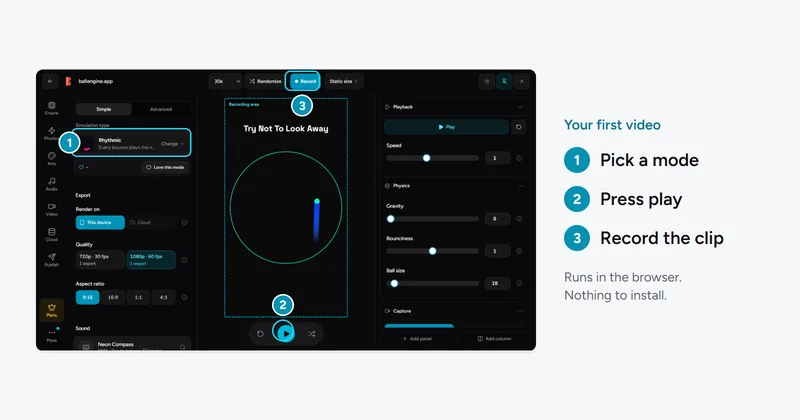
Getting Started With BallEngine Creator Studio: The Complete Beginner's Guide
New to BallEngine? This complete beginner guide walks you from opening the studio to publishing your first video, the interface, the core modes, physics parameters, music sync, recording, and export.
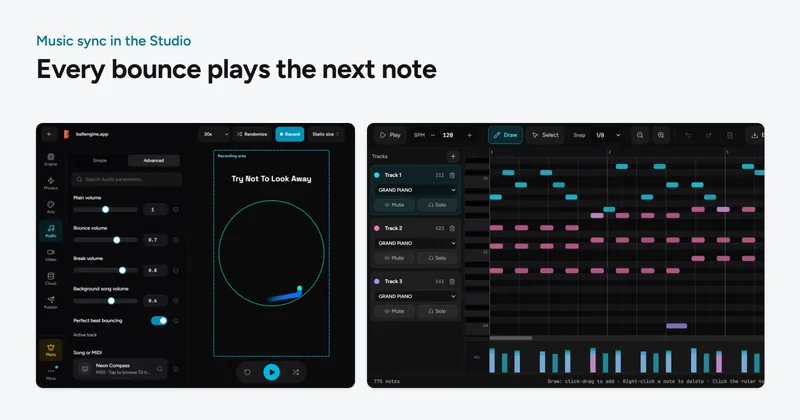
How to Make a Bouncing Ball Video Synced to Music (Complete 2026 Guide)
Everything you need to make a bouncing ball that plays a song, how music-synced physics works, a full step-by-step BallEngine workflow, MIDI and scale tips, and how to publish.